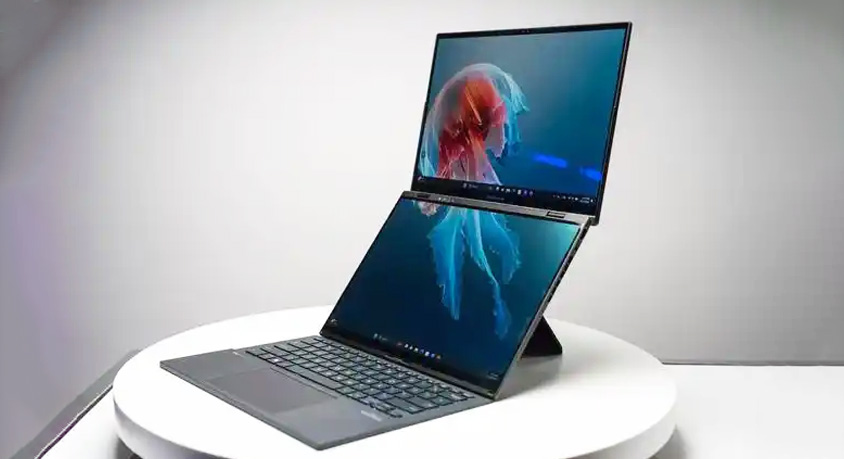
The pursuit of productivity in computing has long followed a simple equation: more screen real estate equals more potential workflow. This logic drives the multi-monitor desktop setup. The dual-screen laptop, exemplified by devices like the latest Asus Zenbook Duo, attempts to compress this paradigm into a portable form factor. It presents a compelling proposition: carry a dual-monitor workstation in your backpack. However, this engineering ambition collides with fundamental physical and ergonomic realities. After using a Zenbook Duo configuration—featuring two 14-inch 2.8K 120Hz OLED displays, a Core Ultra 9 processor, 32GB of RAM, and weighing 1.65 kg (3.63 lbs)—for three weeks across various environments, the central question is not whether dual screens are useful. It is whether the utility gained justifies the significant compromises in portability, battery life, and ergonomic flexibility that this design inherently demands.
In a controlled, spacious environment like a home office, the device can unlock genuine workflow advantages. The two identical, stunning OLED screens, connected by a robust hinge, can be used in several modes: a traditional laptop with a virtual keyboard on the lower screen; a massive, continuous desktop canvas; or a presentation mode with one screen facing the user and the other facing an audience. For specific professional tasks, this is powerful. A developer can have IDE code on one screen and documentation or a terminal on the other. A financial analyst can keep a live spreadsheet on one display and a constant stream of market data or emails on the second. The software experience, powered by Asus's ScreenXpert utility, allows for intuitive window snapping and app management across both panels. In these focused, stationary scenarios, the dual-screen setup provides a tangible efficiency boost over constantly alt-tabbing on a single screen.
The moment you attempt to use this device as a portable laptop, the equation changes dramatically. The core issue is mass and balance. At nearly 3.7 pounds, it is substantially heavier than a mainstream 14-inch ultrabook like the MacBook Air (M3, 14-inch: 2.7 lbs). This weight is constantly felt in a backpack. More critically, in a constrained space like a coffee shop or an airplane economy seat, the device's form factor becomes a liability. To use both screens effectively, you need significant depth on the table—the unfolded device is deep, often pushing your coffee perilously to the edge. Using it in traditional laptop mode with the virtual keyboard feels inherently less stable and tactile than a physical keyboard. The brilliant screens are also highly reflective and can be difficult to angle perfectly in bright, variable lighting, potentially drawing unwanted attention. The "portable workstation" ideal falters against the reality of crowded, shared public spaces.
Battery life is the second major physical constraint. Driving two high-resolution OLED panels is immensely power-intensive. Where a standard laptop with a similar CPU might achieve 8-10 hours of light use, the Zenbook Duo struggles to reach 5-6 hours under comparable conditions. The device literally consumes its potential productivity gains through its power budget. This necessitates carrying the substantial 130W charger, adding further weight, and constantly scouting for power outlets—a practice that defeats the purpose of untethered mobility. You are trading endurance for expanse.
Therefore, the assessment of this device hinges entirely on user profile and movement patterns. The dual-screen laptop is a niche, purpose-built tool. It is ideal for the stationary-nomad: the consultant, engineer, or content creator who frequently works from different fixed locations (client offices, short-term rentals, libraries) but who can always secure a spacious table and is rarely more than a few hours from a power outlet. For them, the ability to deploy a dual-screen setup anywhere is worth the weight and battery penalty. It replaces the need for a permanent dual-monitor desk or the hassle of traveling with a portable monitor.
Conversely, it is a poor choice for the true mobile worker who values all-day battery life and operates from sofas, cramped cafes, or airplanes. It is also excessive for the general user whose multitasking rarely exceeds a document alongside a web browser—a scenario easily handled by split-screening on a single, lighter, longer-lasting ultrabook. The dual-screen design solves for a very specific type of cognitive load (context switching between multiple applications) while introducing pronounced physical load (weight, bulk, power drain).
The innovation is not a gimmick; it is a deliberate and calculated trade-off. It makes the portable computer significantly less portable to make it marginally more powerful in specific contexts. The future of laptop design may not be about adding more screens, but about making a single, superb screen so versatile and efficient that the cost of a second one—measured in grams, watts, and awkwardness—is no longer justified. For now, the dual-screen laptop stands as a fascinating experiment that proves its own hypothesis: more screen space can boost productivity, but only if you are willing to bear the very real, very tangible weight of that potential.
Disclaimer: Mention of any brand or trademark is for identification only and does not imply partnership or endorsement