

I used to snap screenshots in Ghost of Tsushima like a tourist with a broken phone—Jin’s face half-cut off, the sunset washed out, a random bush blocking the entire view of the bamboo forest. I’d send them to my friend Mila, who’s a game photography pro, and she’d reply with a meme: “Is this a crime scene photo or a game pic?” Embarrassed, I begged her to teach me. Thirty minutes later, I took a shot of Jin standing in a field of cherry blossoms, the sun dipping behind Mount Tsushima, and my DMs blew up with “How’d you get that?” Turns out, game photography isn’t about mashing the screenshot button—it’s about tricking the game into looking like a samurai movie. And Tsushima? It’s the perfect classroom—no fancy gear needed, just a little patience and know-how.
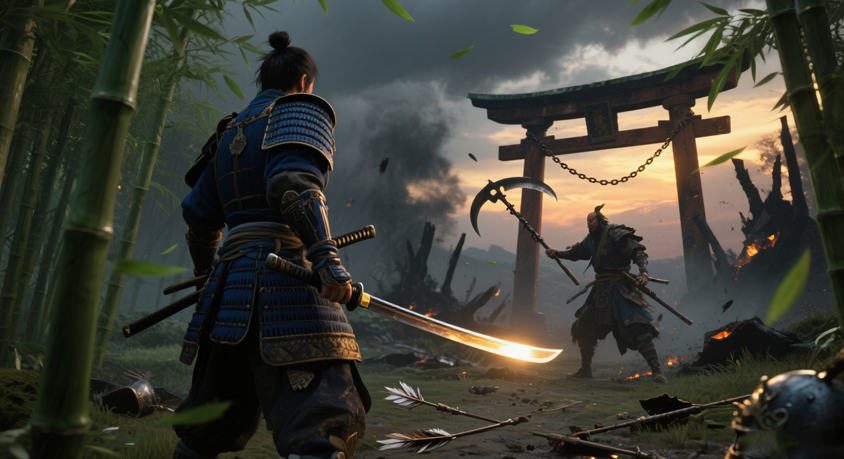
First rule: Ditch the “center everything” habit. Mila made me turn on the grid in Tsushima’s photo mode—the lines that split the screen into thirds. “Put the good stuff on the lines, not the middle,” she said. So when I wandered into the bamboo forest near Komatsu Village, I lined Jin up on the left third, letting the tall green stalks fill the right two-thirds. Suddenly, the shot wasn’t just “Jin in bamboo”—it felt like he was immersed in the forest, not just standing in front of it. Same with the beach at Akashima: I lined the horizon (where the ocean meets the sky) on the bottom third, and Jin—silhouetted against the sunset—on the top left. Now it looked like a postcard, not a random snap. Tsushima is packed with these “frame-worthy” spots—you just need to stop rushing and line them up.
Lighting is the next game-changer—even in a virtual world. I used to take photos at noon, when the sun’s harsh and everything looks flat (think: Jin’s armor glowing like a neon sign). Mila rolled her eyes and said, “Wait for golden hour—early morning or late evening.” She was right. At dawn, the sky turns soft orange, and the mist over the rice fields glows like it’s lit from within. I took a shot of Jin riding his horse through that mist, and for a second, I forgot it was a game. If you can’t wait for golden hour? Use the in-game weather. Rain makes the lanterns in Khotun Khan’s camp glow brighter, and snow in the northern mountains turns the trees white—making Jin’s red armor pop like a brushstroke. Pro tip: Avoid cloudy days unless you want your wallpaper to feel like a gray Monday.
Then there’s Tsushima’s photo mode—stop ignoring the sliders. I used to leave everything on default, but Mila showed me how to tweak “field of view” (FOV) to make shots feel bigger. Crank it up a little in wide open spaces (like the coast at Cape Izumi), and the ocean looks endless. Turn it down when you’re close to Jin, and it focuses on him—perfect for shots of him holding his katana. The “depth of field” slider is another secret: blur the background a tiny bit, and suddenly Jin (or a Shinto shrine, or a cherry blossom tree) becomes the star. I tried it on a shot of Jin in front of a torii gate—blurred the trees behind, and the gate looked like it was glowing. Oh, and don’t sleep on the filters! The “Cinematic” filter softens the colors, making everything look like a scene from a samurai film (no over-saturating—Mila says that’s a “photography sin”).
You don’t need fancy software for post-editing—just a little tweak. I use a free phone app to bump up the contrast (so the sunset’s orange pops) and darken the shadows (to make the bamboo look deeper green). Mila’s rule: “Tsushima is already beautiful—don’t turn it into a neon mess.” I once overdid the saturation, and Jin’s armor looked pink. Oops. Keep it simple: adjust brightness if it’s too dark, tweak contrast if it’s flat, and save it to a USB (one of our picks!) so you can set it as your laptop wallpaper. Nothing beats opening your computer and seeing a shot you took—no stock photos needed.
Last week, I posted a photo of Jin standing on a cliff, the ocean below glowing at sunset, and Mila commented: “Finally—you stopped taking crime scene photos.” I laughed, but it’s true. Game photography isn’t about being perfect—it’s about noticing the little things: the way light hits a temple, the way cherry blossoms fall, the way Jin’s cloak blows in the wind. Tsushima is full of these moments—you just need to slow down, open photo mode, and capture them. Next time you play, don’t rush to the next mission. Stop, look around, and snap a shot. You might end up with a wallpaper that makes your friends go “Is that really a game?” Spoiler: It is. And you took it.
Disclaimer: Mention of any brand or trademark is for identification only and does not imply partnership or endorsement